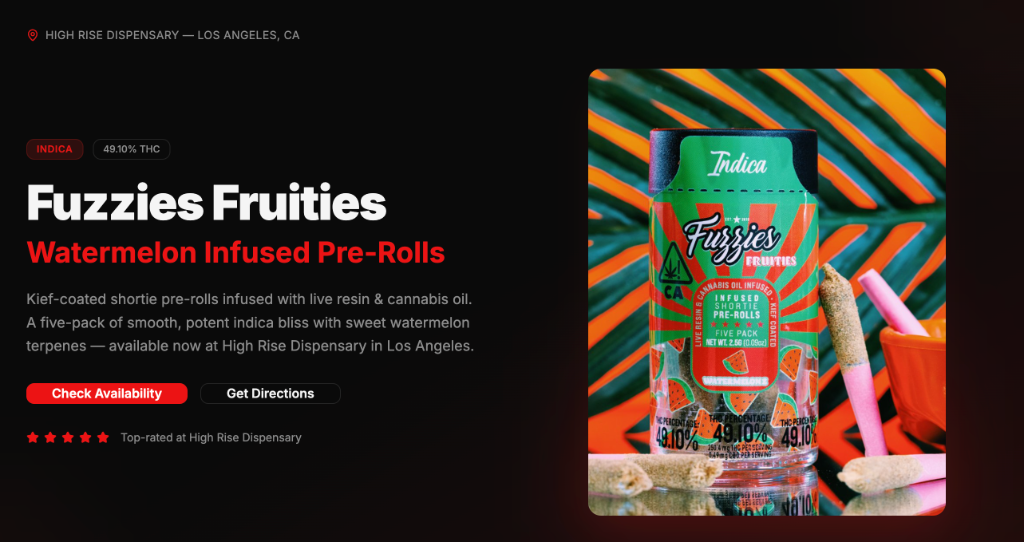
An AI builder can turn a product image and a focused brief into a working cannabis landing-page draft quickly, but there is no responsible universal promise that every page will be production-ready in five minutes. The build time depends on the source material, page logic, integrations, review requirements, and revisions. The useful advantage is reaching a concrete first version sooner so the team can evaluate the message, structure, and customer path.
This workflow uses Base44 as the example because it can generate a frontend, data structure, authentication, hosting, and integrations inside one project. The same operating rules apply to any AI-assisted builder: define the job, provide verified inputs, separate the draft from the source of truth, and test the real page before publishing.
Start with the page’s business job
A landing page should help one audience complete one primary action. For a consumer product, that action might be finding an authorized retailer, understanding the product format, or joining an approved launch list. For a wholesale audience, it might be requesting current product information or accessing a retailer resource. If the page tries to serve every audience equally, the first screen becomes a compromise.
Write the job before writing the prompt:
- Audience: who is the primary visitor and what do they already know?
- Offer: what verified product, service, event, or resource is being presented?
- Action: what should the visitor do next?
- Evidence: which approved facts, images, records, and destinations support the page?
- Constraints: which claims, markets, age controls, rights, or technical requirements need review?
This prevents an attractive draft from hiding a weak brief. It also gives the reviewer a clear basis for deciding whether the first version works.
Prepare the source package before prompting
For the demonstrated Fuzzies Infused Pre-Rolls concept, the starting material included a product image, brand direction, dispensary context, and requested information sections. That is enough to establish a visual and editorial direction, but it is not enough to invent potency, ingredients, availability, pricing, retailer participation, or legal claims.
Build a compact source package with the exact product name, approved description, market, current destinations, media rights, logo files, colors, required warnings or review notes, and the person responsible for approval. If a fact is unknown, mark it unknown. Do not ask the builder to fill gaps with “industry-standard” details.
Keep private customer information, passwords, access codes, and unnecessary business records out of the prompt. Test with sample or dummy content rather than real customer data. The principle applies even when the page seems simple.
Write a prompt that defines the page
A useful prompt describes the audience, page sections, approved facts, visual direction, primary action, and technical expectations. It should also state what the builder must not invent. For example:
Create a mobile-first landing-page draft for the provided product image. Use only the supplied product facts. Include a concise introduction, verified features, a retailer-finder placeholder, an FAQ based only on the approved source sheet, and one primary action. Do not create medical claims, potency values, prices, retailer availability, testimonials, or legal conclusions. Flag missing information for review.
This is more useful than “make a premium cannabis landing page” because it defines the content boundary and review standard. The builder still makes design choices, but it is working inside a real assignment.
Build the minimum complete customer path
The first version needs enough structure to test the journey. It does not need every animation, campaign extension, or integration the team might eventually want. A practical minimum includes:
- A clear title and direct explanation of the offer.
- A relevant product or campaign visual with descriptive alt text.
- Verified supporting information organized for scanning.
- A primary action with a real or clearly labeled test destination.
- Mobile navigation and readable spacing.
- Basic error and empty states for any dynamic element.
A Base44 project ships with managed hosting and can be expanded with data, authentication, code access, and integrations. Use only the parts required for the page. A static campaign destination does not need an account system simply because the platform offers one.
Use structured records when the page will change
If retailers, events, products, or FAQs will be updated repeatedly, store them as records instead of embedding every value in the page component. Structured data makes it easier to update one item, filter by market, and reuse the same information elsewhere. It also creates a clearer separation between approved facts and presentation.
For a retailer finder, define what makes a location current, who updates it, what happens when inventory is unknown, and where the destination link goes. A map with stale locations is worse than a simple verified list.
Treat generated copy as a draft
AI-generated copy can organize the brief and propose useful headings. It cannot verify facts the team did not provide. Review every product statement, date, destination, comparative claim, quote, and statistic. If the page is market-specific, confirm that the language and required review fit that market.
Remove generic filler. Phrases such as “premium experience,” “elevate your lifestyle,” or “revolutionary quality” do not explain why the product matters. Replace them with approved, concrete information or delete them. The page should sound like the brand, not the builder’s default copy.
Connect the landing page to the broader brand positioning and content system. A campaign destination works better when the headline, social assets, retailer materials, and follow-up email all make the same promise.
Review accessibility and mobile behavior
Mobile review is not a scaled-down desktop check. Test the real published or preview route at narrow widths. Confirm that the title wraps without clipping, buttons remain visible and easy to activate, images stay inside the content width, embedded media does not create horizontal scrolling, and paragraphs remain readable.
Check keyboard navigation, visible focus states, heading hierarchy, form labels, color contrast, error messages, and meaningful alternative text. A product image needs a description of the visible product and context, not a string of keywords. Essential information should remain available as text rather than appearing only inside a graphic.
The cannabis web-design guide provides the wider usability framework. AI can create components quickly, but the team still needs to inspect how those components behave with real text, long names, missing images, and different devices.
Check search and AI-discovery fundamentals
A search-focused page needs more than a keyword in the title. The page should answer the visitor’s question directly, use a descriptive URL and canonical, provide accurate metadata, link to relevant supporting pages, and make its primary content available to crawlers. If the page is temporary, decide whether it should remain indexable after the campaign.
Do not generate an article simply to make the landing page longer. Publish supporting editorial content only when it answers a distinct question with enough evidence to deserve its own canonical page. A focused cannabis SEO structure helps prevent several thin pages from competing for the same intent.
Before launch, inspect the rendered title, canonical, metadata, social preview, structured data, internal links, and any noindex or robots directives. The builder’s preview is not proof that search engines receive the intended page.
Test integrations and data handling
If the page sends email, uploads files, writes leads, calls an external service, or uses an AI feature, test the full request and failure path. Confirm where data is stored, who can access it, what consent language is required, and how a user can correct a mistake.
Built-in integrations, OAuth connectors, and backend-powered external APIs are three different paths with different failure modes, and certain features carry plan and credit requirements. Verify the current plan and production credentials instead of assuming a demonstration connection will behave the same way after launch.
Run the platform’s security checks and review permissions. The platform supplies the controls and certifications; you remain responsible for your own application’s access settings, so review the permissions and run a security scan before you publish.
Publish only after a real-page preflight
The preflight should cover the complete destination:
- Every factual statement matches the approved source package.
- Every link reaches the intended live destination.
- Forms provide clear success and failure feedback.
- Images load, remain unique, and have useful alt text.
- Desktop and narrow-screen layouts have no clipping or horizontal overflow.
- Metadata, canonical, social previews, and structured data match the visible page.
- Analytics record the agreed actions without collecting unnecessary data.
- An owner is assigned to updates, corrections, and expiration.
After publishing, open the production URL in a fresh session and repeat the critical actions. A page is not finished because the editor saved successfully.
What this workflow can and cannot prove
The workflow demonstrates that a team can move from an approved image and brief to a working, reviewable page faster than a document-only process. It does not prove that every project takes the same amount of time, that generated copy is accurate, or that the page will rank or convert. Those outcomes depend on the brief, execution, distribution, market, and measurement period.
AI-assisted building is most useful when it shortens the path to a test without lowering the evidence standard. Use the first version to expose decisions, then apply the brand, editorial, technical, and operational judgment required for production.
The operating takeaway
Start with a verified source package and one customer action. Ask the builder for the smallest complete path, treat its output as a draft, and test the rendered production page. The valuable promise is not “finished in five minutes.” It is a faster route to a concrete version the team can review, correct, and improve.